
Find Your Angle with the Research Panel
The Research Panel is your behind-the-scenes powerhouse for creating content that ranks. Whether you're starting from scratch or refining existing content, this right-side panel gives you quick access to the keywords, questions, structures, and insights from high-performing content across the web.
In this article
Accessing the Research panel
You'll encounter the Research tab in different sequences depending on the document type you chose.
- In the Rank Ready workflow, you can access the Research panel after your article has been written by selecting the 🔍 icon in the upper right.
- Within a Research Project, you'll have access to the research panel immediately in the right sidebar.
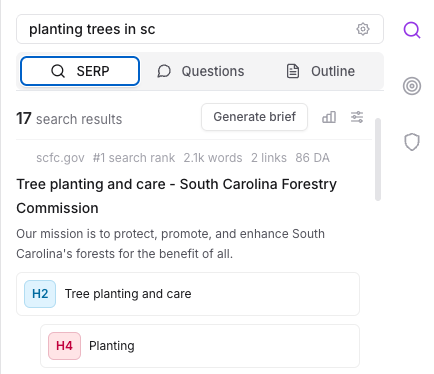
The SERP tab
The SERP (Search Engine Results Page) tab shows you exactly what’s working on page one of Google—no extra tabs or manual digging required.
- See top search results and header structures
- Easily generate a content brief with just a few clicks
- Customize your view by adding or removing sources from the list
The Questions tab
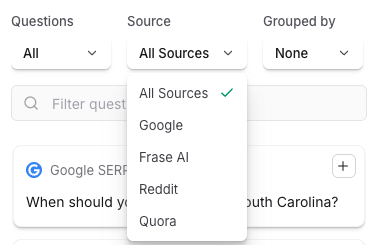
In the Questions tab, you will see a list of common questions asked in places like Google, Reddit, and Quora.
- Click the + icon to insert a question into your documents outline.
-
Click the "Curated" dropdown to filter or sort the results by source.
The Outline tab
The Outline tab helps you build a high-performing article structure, faster. Here you can:
- Pull headers directly from the top 20 results for fast inspiration.
- Generate a full outline using AI that’s tuned to search intent.
- Drag, drop, and edit your way to a Rank Ready header structure.