
AI Visibility & Search Tracking
Learn how to set up AI Visibility tracking, add prompts, compare competitors, and monitor your brand’s presence across top AI search platforms.
📖 AI Visibility is available as an add-on or included in higher tier plans. See our pricing page for a full breakdown. Each plan has different thresholds for brands, prompts, & data history retention.
In this article
- Set Up Your Brand Profile
- Add & Manage Prompts
- Understand Your AI Visibility Dashboard
- Track Progress Over Time
Set Up Your Brand Profile
💡 Your brand profile is the foundation of AI Visibility tracking. It tells Frase which brand and competitors to monitor across AI platforms.
To create your brand profile:
- In the left sidebar, open the AI Visibility tab.
- In the upper right corner, click Add Brand.
- Enter your brand name and website
- Select the competitors you’d like to compare yourself against
- Choose the prompts you’d like to start with (you can use AI to auto generate OR import prompts from a CSV)
- Click Finish setup
Add and Manage Prompts
💡 Prompts represent the real questions customers ask AI assistants. Adding the right prompts helps you measure visibility where it matters most.
To add prompts:
- In the AI Visibility tab, find the Tracked Prompts section & click the + Add Prompt button
- Choose to auto-generate with AI or upload prompts via a CSV
- Click Save.
💡 Start with prompts tied to buying decisions—comparison queries, category questions, and product-level searches.
Understand Your AI Visibility Dashboard
💡 Your dashboard gives you a complete view of how often your brand appears across AI-generated responses and how you compare to your competitors.
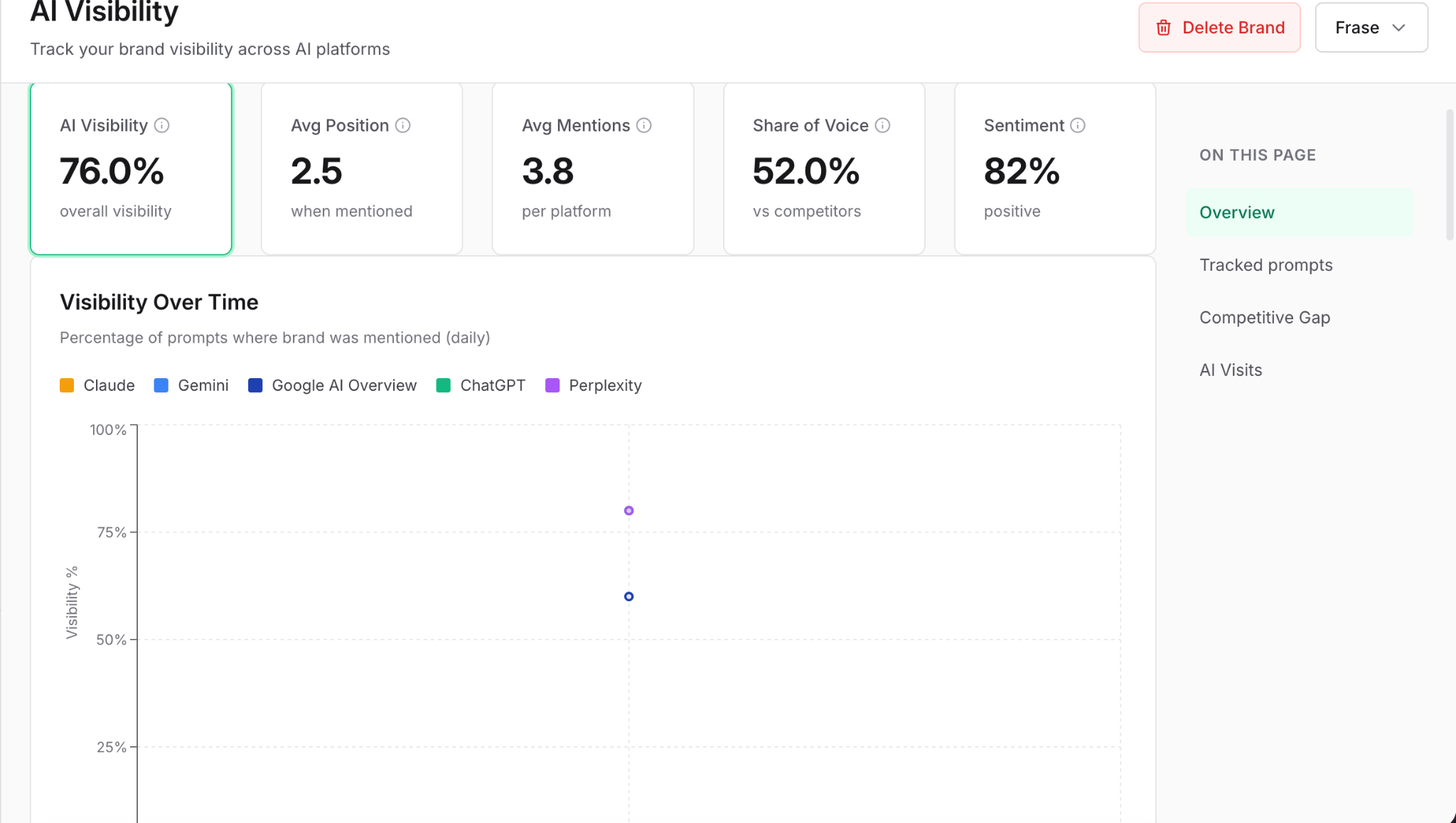
Key metrics you’ll see:
- AI Visibility Score: Percentage of prompts where your brand appears.
- Average Position: How high your brand ranks within AI responses.
- Avg Mentions: Average number of mentions per platform, per day.
- Share of Voice: How often your brand is mentioned compared to competitors.
- Sentiment: Whether your mentions are positive, neutral, or negative.
Below these key metrics, you'll see sections for your tracked prompts, competitor analysis, competitive gap analysis, and AI referrals.
💡 Installing the tracking snippet under the AI Referral section allows you to see more than just where you're appearing across LLMs. It allows you to see how many visits you get to your website because of LLM recommendations
Track Progress Over Time
As you optimize content, your AI visibility updates automatically.
To monitor trends:
- In the AI Visibility tab, open your brand dashboard.
- Select a date range at the top.
- Compare visibility scores, positions, and sentiment over time.
Historical data varies by AI Visibility plan:
- Lite—30 day history
- Standard add-on & Scale plan—6 month history
- Pro add-on & Advanced plan—24 month history